By the MR Web Solutions team, Hartford, CT
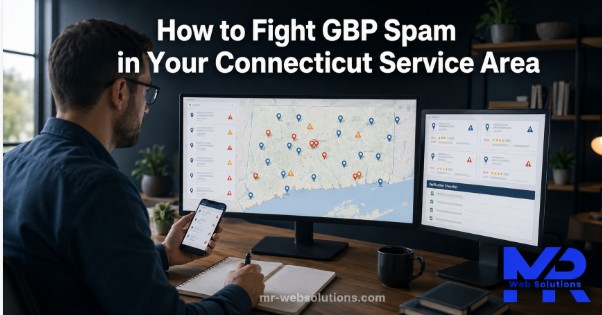
It is a normal workday at our office. We are running a rank check for Mr-Suds Washing across Newington, Wethersfield and Hartford. Mr-Suds is a real pressure and soft washing company, and we look after its website, Google Business Profile and local SEO.
Most of the map pack looks the way you would expect. But a few listings stand out. Some have names that read like a search phrase instead of a company. Some pins sit on quiet residential streets or inside office buildings, with no sign of the business in Street View. Some seem to appear one month and vanish the next.
We did not assume anything. We checked.
That is what this article is about. GBP spam is a real problem for home service businesses in Hartford County, because every fake listing in the three pack can take a call meant for a real company. Below is how we spot it, how we prove it, which Google tool to use, what timelines to expect, and what we never do.
What is the fastest way to fight GBP spam?
To fight GBP spam, first confirm the listing breaks Google’s guidelines using Street View, the business website and state records. For a wrong name or a place that does not exist, use Suggest an edit in Google Maps. For fraud involving the name, address, phone or website, file the Business Redressal Complaint Form with evidence.
The rest of this guide walks through each step, with Google’s own wording and the Connecticut tools we use.
What counts as GBP spam under Google’s rules?
Google Business Profile spam is any listing that breaks Google’s Guidelines for representing your business on Google. It is not “a competitor I don’t like.” It is a specific rule being broken. Here are the ones we see most in Connecticut home services.
Is a keyword stuffed business name against the rules?
Yes. Google says your name should reflect your real world business name. In its words: “Including unnecessary information in your business name isn’t permitted and could result in the suspension of your Business Profile.”
A common pattern is a brand name with extra words added, like “Pressure Washing Hartford CT” tacked onto the end.
One caution. If a company’s legal name really includes those words, and its signage and state records match, it may be allowed. That is why we verify before we report.
Can a business list a virtual office or PO box?
No. Google’s guidelines say: “P.O. boxes or mailboxes located at remote locations aren’t acceptable.” A rented mailing address is not eligible for a profile either.
Coworking spaces have strict limits. Google says a business can’t list an office there unless it has clear signage, receives customers during business hours, and is staffed by its own people during those hours.
Real service area businesses are supposed to hide their address and list the towns they serve instead.
Are duplicate listings allowed?
No. Google’s guidelines state: “There should only be one profile per business.”
A pattern worth watching is a cluster of near identical listings. Same photos, same website, same wording, but different phone numbers and different pins spread across several towns.
What about lead generation listings?
These are listings that exist only to collect calls and sell them to whoever pays. There is no real business behind the name.
Google’s guidelines say: “Sales associates or lead generation agents for corporations aren’t individual practitioners and aren’t eligible for a Business Profile.” The guidelines also require that “The phone number must be under the direct control of the business.”
A listing whose phone rings a call center that hands you off to “a local pro” is worth a closer look.
How far can a service area reach?
Google’s service area guidance says the overall area shouldn’t be more than about two hours of driving from where the business is based.
In Connecticut, two hours covers the whole state and beyond. So the size of a service area tells you little. Look at where the pin sits instead.
Is a fake review GBP spam too?
Yes, but it has its own reporting path, covered later in this guide. Google’s prohibited content policy covers fake reviews, and the tools for handling them are different from the tools for fake listings.
How do you spot GBP spam in a Connecticut service area?
This is the same check we run for Mr-Suds. It uses free tools, and once you know it, each listing goes quickly.
Where do spam listings show up on a geo grid scan?
A geo grid is a rank check run from many points across your service area at once, instead of from one spot. It shows how rankings change from street to street.
Spam listings often show a telltale shape. They rank strongly in a tight circle right around their pin, and almost nowhere else. A real company with real jobs and reviews usually shows a wider spread.
Most local rank trackers offer geo grid scans. We explain how we read these results in our post on how we approach the map pack for pressure washing.
What does Street View tell you about the address?
Drop into Street View at the pin. Look for:
- A sign, a storefront or a branded vehicle
- A house on a residential street with no sign of a business
- An office building with dozens of suites and no listing in the directory
Always check the imagery date in the corner. Street View can be a few years old.
And remember: a missing sign is not proof on its own. Many real service area businesses work from home. Street View is one piece of evidence, not the whole case.
How do you check the business with the Connecticut Secretary of the State?
Connecticut gives you a free public business search. Start at the Secretary of the State’s Business Services Searches page and use the “Search a Business” link.
Search for the name on the listing. If a record comes up, compare the name, status and address on file with what the listing shows.
A listing with no matching business record, or a record with a very different name or address, is useful evidence.
One caution here too. A sole proprietor can trade under a name without a formal business entity. So a missing record alone does not prove a listing is fake.
How do you verify a Connecticut license with DCP?
Some trades need a state credential from the Department of Consumer Protection, such as plumbing and electrical work. You can check credentials with the state’s eLicense lookup, which DCP links from its Verify a License page.
DCP’s February 2025 consumer alert puts it simply: “The credential should match the individual’s identity, as well as be appropriate for the scope of work to be completed.”
A listing that claims a licensed trade with no matching credential is worth noting in your log.
What other red flags should you check?
Each of these is a flag, not proof. Several together start to tell a story.
- A thin website that looks like a template reused for many cities
- A phone number that rings a call center or answers with a generic greeting
- Reviews that arrived in a burst, all within days, with no photos
- The same photos appearing on several listings
- 24/7 hours for a trade that does not need emergency service
- A pin that sits between two towns with nothing at the address
Which Google tool should you use for each type of GBP spam?
Different problems need different tools. Using the wrong one wastes time.
| Spam type | How to spot it | Google tool | Evidence to collect |
|---|---|---|---|
| Keyword stuffed name | Name reads like a search phrase | Suggest an edit (change name); Redressal form for repeat cases | Street View sign, website header, state record name |
| Fake address or virtual office | No business at the pin, multi suite building | Redressal form (Address) | Street View, building directory, state record |
| Business does not exist | No sign, no record, no license | Suggest an edit (“Place is closed or not here”); Redressal form (“This business doesn’t exist”) | Screenshots, state search result, phone test |
| Duplicate or cluster listings | Same photos, same site, different numbers | Redressal form with a list of URLs | List of Maps URLs and matching details |
| Lead generation listing | Generic site, call center answer | Redressal form (Phone number or Website) | Call notes, website screenshots |
| Fake reviews on your profile | Burst of reviews, no history | Reviews Management Tool, Report | Review dates, reviewer profile notes |
Simple, single cases usually start with Suggest an edit. Patterns, clusters and fraud go to the redressal form.
How do you report GBP spam step by step?
How do you use Suggest an edit in Google Maps?
Use this for single, simple cases.
- Sign in to your Google account.
- Open the listing in Google Maps.
- Choose Suggest an edit.
- To fix a name, change it to the real world name and submit.
- To remove a place that does not exist, choose Place is closed or not here, then Doesn’t exist here, then Submit.
Google’s removal help page says you might receive a status email with follow up questions. If the request is approved, the business is removed from Search and Maps.
When should you file the Business Redressal Complaint Form?
The Business Redressal Complaint Form is for fraud or misleading information on a listing. It asks for:
- Your full name and contact email
- The name of the business or organization being impacted
- The type of malicious content: Title, Address, Phone number, Website, or “This business doesn’t exist”
- The public URL of each listing
- An optional file upload
- A detailed explanation
Google is clear about its limits. The form says: “We cannot guarantee that any action will be taken on your complaint after you complete and submit this form.” It also says you will not be updated on the status.
For bulk reports, Google recommends submitting 10 to 100 URLs at a time. And the form is not for fixing your own listing.
How do you write the explanation so it gets read?
Ben Fisher’s guide on BrightLocal gives the most practical advice we have found.
- One spam type per submission. All name spam in one report, all address spam in another.
- Lead with the rule broken. Quote the guideline.
- Link the evidence. Host screenshots in a shared Google Drive folder and link to it.
- Explain the harm to customers. A homeowner calls a fake listing and gets a stranger, or a middleman.
Do not write about your rankings. As Fisher puts it, this “is not the place to cry about how it is impacting your rankings.”
How do you report fake reviews on your own profile?
Fake reviews on your own profile follow a separate path, described on Google’s review removal page.
- Open the Reviews Management Tool, or read reviews from your Business Profile.
- Click Report next to the review.
- Choose the reason that matches the policy it breaks.
You can track each report. The statuses are “Decision pending,” “Report reviewed, no policy violation,” and “Escalated.” If a review does not qualify for removal, you get a one time appeal, and you can select up to 10 reviews.
Only report reviews that break policy. A harsh but honest review from a real customer is not spam.
Google also added protection in April 2026. If a sudden spike of spam reviews hits a profile, Google says it will “quickly remove the fake content, pause new reviews on the profile, alert the Business Profile owner.”
When should you post in the Google Business Profile Community?
Only after a well documented report has not been actioned. The Google Business Profile Community is a public forum where volunteer Product Experts can review a case and sometimes escalate it.
Keep the post factual and short. Google’s own warning applies: do not share private or confidential information in the public forum.
If you’d rather not spend an afternoon in Street View, our free growth audit includes a spam scan of the map pack for your main service and towns. See our local SEO in Hartford work, or book a call.
How should you document evidence so Google takes it seriously?
Good evidence is what separates reports that move from reports that sit. For Mr-Suds, we keep a simple log for every listing we look at.
What goes in a simple spam evidence log?
- [ ] Date found
- [ ] Listing name exactly as shown
- [ ] Google Maps URL
- [ ] Screenshot of the listing
- [ ] Street View screenshot, with the imagery date visible
- [ ] Secretary of the State search result
- [ ] License lookup result, if the trade needs one
- [ ] Phone call notes: who answered, what they said
- [ ] Which rule it breaks, quoted from Google’s guidelines
- [ ] What we submitted, and when
- [ ] Outcome, and the date we rechecked
A spreadsheet works fine. The point is that every claim in your report has a screenshot or a link behind it.
What evidence does not help?
- Opinions. “This company is shady” proves nothing.
- Ranking screenshots alone. They show the listing ranks, not that it breaks a rule.
- Third party pages. Fisher advises not to use sites like Facebook or Yelp as proof, although LinkedIn can work sometimes.
- Angry language. It makes a report harder to read and easier to dismiss.
How long does Google take to act on a GBP spam report?
Honestly, it varies. Here is what Google states and what practitioners have seen.
What timelines does Google actually state?
| Report type | What Google says |
|---|---|
| Review reports | “Review evaluation typically takes several days” |
| Business Redressal Complaint Form | No timeline, no status updates, no guaranteed action |
| Suggest an edit removal | You might receive a status email; no timeline stated |
What have practitioners seen in the real world?
In his BrightLocal guide, first published in 2020, Ben Fisher shared his experience with the redressal form. Smaller batches were often actioned in the same week. Most spam he saw was actioned in about two weeks. Batches of 50 or more listings took three weeks or longer.
Treat that as one experienced practitioner’s view from a few years ago, not a promise.
What does our own experience look like?
Some reports move. Some do not. And some listings come back after they are removed.
That is why we recheck the Mr-Suds map pack every month. When a report does not move, we do not flood Google with the same complaint. We gather fresh evidence and report again, clearly, one spam type at a time.
What if Google does not remove the GBP spam?
What is the escalation path after a failed report?
- Wait at least two to three weeks after your report.
- Recheck the facts. Is the listing still breaking the rule? Gather fresh screenshots.
- Submit again with a clearer explanation, one spam type per submission.
- Post a factual case in the Google Business Profile Community for Product Expert review.
- Keep improving your own profile and website while you wait.
When should you stop and compete instead?
Here is a common situation. An owner sees a new listing in the pack and assumes it is fake. We run the checks. The business has a state record, a matching address, a real truck in Street View and a working local phone.
That is not spam. That is a new competitor.
When a listing checks out, leave it alone. Put the energy into what you control: reviews, photos, service pages and answering every call. Our guide to ranking in your service area covers that side.
What should you never do when fighting GBP spam?
Fighting spam the wrong way can hurt you more than the spam does. Google’s policy bans posting “content on a competitor’s place or business to undermine that business’ or product’s reputation.”
- Never leave fake or negative reviews on a competitor’s profile.
- Never submit edits you cannot prove. Workshop Digital warns that suggesting inaccurate information to sabotage a competitor will more than likely get your own listing penalized.
- Never call, threaten or harass the other business or its staff.
- Never post public accusations naming a business on social media.
- Never copy the spam tactic for your own listing.
Our own rule, and the one our founder Shohanur Reza holds the team to, is simple: we only report what we can prove, and we never touch a competitor’s reviews. That is how we work on the Mr-Suds map pack and for every client.
How do you protect your own profile while you fight spam?
Is your own profile clean enough to report others?
Before reporting anyone, check your own listing:
- Your real world name only, with no extra keywords
- Your address hidden if you are a service area business
- A local phone number under your direct control
- One profile per business
A clean profile means you can report others with confidence. It also helps Google understand who you are, which we cover in our post on building a brand Google understands.
What new Google protections help owners in 2026?
Google’s April 16, 2026 announcement shared both the scale of the problem and new tools for owners.
In 2025, Google says it:
- Blocked or removed over 292 million policy violating reviews
- Removed over 13 million fake Business Profiles
- Blocked 79 million inaccurate or unverified edits
New protections include:
- Email alerts so verified, active owners can review important edits to their profile
- Gemini models that catch and block policy violating edits faster
- Review spike protection that pauses new reviews and alerts the owner during a spam attack
Make sure the email address on your Business Profile is one you actually check. Those alerts only help if someone reads them.
What does fighting GBP spam look like for a Hartford area home service business?
Here is how the routine plays out, in general terms, from our Mr-Suds work.
A monthly rank check in Newington shows an unfamiliar “pressure washing” listing in the three pack. Nobody on the team has seen its trucks on a job, at a supply store or anywhere around Wethersfield, West Hartford or New Britain.
So we run the routine:
- Street View at the pin: a residential street, no sign, no vehicle.
- Secretary of the State search: no record that matches the name.
- Phone test: a generic greeting and an offer to “connect you with a local pro.”
- Evidence log: screenshots, URLs, call notes and the rule it breaks.
- Report: Suggest an edit for the name, then the redressal form with the evidence linked.
- Recheck next month, and report again with fresh evidence if nothing has changed.
Some cases end with the listing removed. Some do not. Either way, the real company keeps working on its own profile in the meantime.
There is one more lesson. While spam takes some visibility, every real call that does come in matters more. Fast follow up and missed call recovery protect the leads you do get. Our AI receptionist with missed call recovery handles that, and our page on marketing for pressure washing companies in Connecticut shows the wider system.
Frequently asked questions about GBP spam
How do I report a spam listing on Google Maps?
For simple cases, open the listing in Google Maps, choose Suggest an edit, and fix the name or mark the place as not existing. For fraud on the name, address, phone or website, or for several listings at once, use the Business Redressal Complaint Form with evidence linked.
What is the Google Business Redressal Complaint Form?
It is Google’s official form for reporting fraud or misleading information on Business Profiles, including fake names, addresses, phone numbers, websites, and businesses that don’t exist. Google says it cannot guarantee action and will not send status updates. It recommends 10 to 100 URLs per bulk submission.
How long does Google take to remove a fake listing?
Google gives no official timeline for listing reports. For reviews, it says evaluation typically takes several days. One practitioner, Ben Fisher, reported that small batches were often actioned within the same week, most within about two weeks, and large batches took three weeks or more.
Can reporting a competitor hurt my Google Business Profile?
Accurate, well documented reports are what Google’s tools are built for. The risk comes from submitting false edits or leaving fake reviews to undermine a competitor, which breaks Google’s policy and can backfire on your own listing. Clean up your own profile before you report others.
Can I put my city in my Google business name?
Only if it is part of your real world business name, shown on your signage and in your records. Google says including unnecessary information in your business name isn’t permitted and could lead to suspension. Adding a city or service just to rank is keyword stuffing.
Is a virtual office allowed on Google Business Profile?
No. Google’s guidelines say rented mailing addresses are not eligible, and P.O. boxes or mailboxes at remote locations aren’t acceptable. Coworking spaces only qualify with clear signage, staff and customers during business hours. Service area businesses should hide their address.
How do I report fake reviews on my profile?
Go to the Reviews Management Tool or your reviews, click Report, and choose the reason. Google shows a status for each report. If a review doesn’t qualify for removal, you get a one time appeal covering up to 10 reviews. Only report reviews that actually break policy.
How do I check if a Connecticut business is real?
Search the name through the Connecticut Secretary of the State’s business search and compare the record with the listing. For licensed trades, check DCP’s eLicense lookup. Then look at the pin in Street View and call the number. No single check is proof, but together they tell a clear story.
Does removing spam improve my map pack ranking?
It can open space in the pack, but there is no guaranteed lift. Google’s local results still depend on relevance, distance and prominence. Our guide on how we approach the map pack covers what moves rankings, and our post on how AI Overviews are changing local search covers what else is shifting.
Should I hire someone to fight GBP spam?
If time is short, a local SEO partner can run the routine every month: scanning, checking, documenting and reporting. Be wary of anyone who guarantees removals. Google says it cannot guarantee action on redressal complaints, so nobody else honestly can.
Want help keeping your map pack honest?
Fighting GBP spam is slow, careful work. Most of it is checking, writing things down and waiting. We do not promise removals, because Google does not either.
What we can do is run the routine for you, every month, alongside the work that actually grows your profile. Our free growth audit includes a spam scan of your main service and towns. Book a call or see our local SEO in Hartford work. You can also read what our clients say.
Call +1 (860) 255 1070, or visit us at 375 Wethersfield Ave, Hartford, CT 06114.