By the MR Web Solutions team, Hartford, CT
It is a normal reporting call with Mr-Suds Power Washing PROs. The business is based in Newington, at 130 Dewey Ave, and Hartford is the market it most wants to grow into.
Search "pressure washing near me" from a phone in Newington, and things look great. But that is not the question that matters. The question is what a homeowner in Hartford sees, a few miles up the road.
When we checked, the answer was very different. In Newington, Mr-Suds sat in the top three of the Google map results for most of the services we tracked. In Hartford, it did not show in the map pack at all.
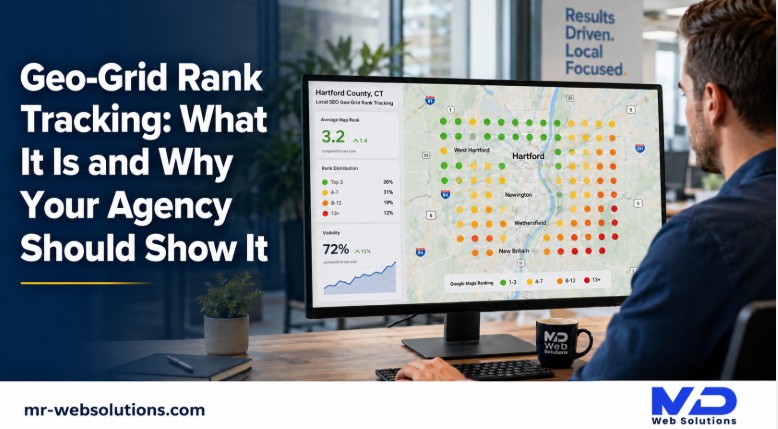
That gap is why geo grid rank tracking exists. A single rank check only shows what Google returns at one spot. A geo grid shows what it returns across your whole service area.
This article covers what a geo grid is, how to read it, what the numbers on the report mean, and what an honest agency report should show you, using real examples from the Hartford County towns we work in every week.
What is geo grid rank tracking?
Geo grid rank tracking checks where your business ranks on Google Maps from many points across your service area, not just one. A tool places a grid of points over the map, runs the same search from each point, and colors each one by your position, so you can see exactly where customers find you.
You will also hear it called a local SEO heat map or a local search grid. They are the same thing.
The method is usually credited to Local Falcon. Localogy describes geo grid tracking as invented by Yan Gilbert, the creator of Local Falcon. Today, many tools offer their own version.
Why is a single rank check misleading for a local business?
Because Google does not show everyone the same map results. Where the searcher stands changes the answer.
How does Google decide who shows in the map pack?
Google explains this on its own help page about improving local ranking. Local results are based mainly on three things:
- Relevance: how well a Business Profile matches what someone is searching for.
- Distance: how far each business is from the customer who is searching.
- Prominence: how well known a business is. Google's page also calls this popularity, and it includes things like reviews and links.
For more on the prominence side, see our post on how Google understands your business.
The same Google page says something every owner should know: there is no way to request or pay for a better local ranking. Ads are a separate, labeled placement.
Why does my ranking look different when I search from my shop?
Your phone at your shop sits right next to your business pin. That is the most flattering place on the whole map to check from.
A customer in another town is farther away, so distance works against you there. That is exactly what we saw with Mr-Suds. The view from Newington was strong. The view from near downtown Hartford was not, even though the business, the reviews and the website were exactly the same.
What does a "you rank number one" screenshot leave out?
Plenty. It usually does not say:
- Where the search was run from
- Which keyword was used
- What device it was on
- What the next town sees
A single screenshot is one point on the map. Your customers live across dozens of them.
How does a geo grid scan actually work?
The idea is simple. Here is what happens behind the colored map:
- You pick a center point, usually your Business Profile pin.
- You pick a grid size, like 7 by 7 points.
- You pick the spacing between points, like half a mile or a mile.
- The tool runs the same search from every point on the grid.
- It records where your business ranks at each point.
- It colors each point by that rank and shows the whole grid on a map.
What happens at each grid point?
At each set of coordinates, the tool runs the search as if someone were standing there. It records the top results and logs your position. On Local Falcon, each point on the grid uses one credit, which is why bigger grids cost more to run.
What do the colors on the heat map mean?
Local Falcon explains its colors in its guide to reading a local SEO heat map:
- Dark green: top 3, the spots that show in the map pack
- Light green: decent rankings, not yet top positions
- Yellow or orange: lower in the results
- Red: virtually invisible at that point
Each tool uses its own legend, so always read the key on the report you are given.
Does running a geo grid scan change my rankings?
A scan reads search results. It does not edit your Business Profile or change anything about your business. Local Falcon says its data comes from clean searches that are not influenced by search history. In practice, running scans is a way of looking, not a way of ranking.
What do ARP, ATRP and SoLV mean on a geo grid report?
These three numbers show up on most Local Falcon reports. Almost nobody explains them in plain words, so here goes. All three definitions come from Local Falcon's guide on how to read a scan report.
What is ARP (Average Rank Position)?
ARP is your average position among the top 20 listings at the points where you appear.
In plain words: when you do show up in the top 20, how high are you on average? A lower number is better. An ARP of 3 means that, where you appear, you are usually around third.
What is ATRP (Average Total Rank Position)?
ATRP is your average position across all the listings the scan finds, including points where you fall outside the top 20.
This is the tougher, more honest number. ARP can look great if you rank well in a small area and do not appear anywhere else. ATRP counts the places where you are buried too. If ARP looks good but ATRP looks bad, your coverage is thin.
What is SoLV (Share of Local Voice)?
SoLV is how often you appear in the top 3 across the scanned area, scored out of 100.
Local Falcon gives its own example: a SoLV of 18.37 means you show in the top 3 at about 18.37 percent of the points. SoLV is a registered trademark of Local Falcon LLC.
Do other tools use the same numbers?
The names change from tool to tool. The ideas mostly stay the same.
| Tool | What it calls your average rank | Other metrics |
|---|---|---|
| Local Falcon | ARP (Average Rank Position) | ATRP, SoLV |
| LocalViking | AGR (Average Grid Rank) | ATGR, SoLV |
| BrightLocal | Average Map Rank | None standard |
| Whitespark | Visibility Score | None standard |
Sources: LocalViking's help center and BrightLocal's geo grid tool comparison.
So it is fair to ask your agency which numbers they report, and why. Both of you should be reading the same scoreboard.
How do you choose grid size and spacing for a service area?
This is where many reports quietly go wrong. The grid has to match the area you actually serve.
What grid sizes are common?
Common sizes are 3 by 3, 5 by 5, 7 by 7 and 9 by 9. Larger grids are available too. Local Falcon offers grids up to 21 by 21. BrightLocal's grid goes up to 15 by 15, or 225 points, and Whitespark also goes up to 225 points.
How far apart should the points be?
The math is easy. A grid spans the number of points per side, minus one, times the spacing.
- A 7 by 7 grid at 1 mile spacing spans about 6 miles edge to edge.
- The same grid at half a mile spans about 3 miles.
Dense areas, like a city center, usually get tighter spacing. Suburbs and rural areas get wider spacing. The goal is for the edge of the grid to reach the farthest town you actually want work from.
Why should points over water or empty land be switched off?
Nobody searches for a pressure washer from the middle of a river. Local Falcon recommends removing points over water and parkland, because those irrelevant points can skew the results.
In Hartford, the obvious example is the Connecticut River between Hartford and East Hartford. Points that land on the water should be switched off.
Why must the settings stay the same every month?
If the grid size, spacing, center point or keyword changes between reports, the before and after comparison means nothing. Adwave's geo grid guide says the same thing: lock the grid settings before you compare periods.
For Mr-Suds, the next check will use the same keywords, the same centers and the same zoom as the last one. If the map gets greener, we want to know it is because the visibility improved, not because the grid moved.
How do you read a geo grid for a Hartford County service area?
Here is what a typical map looks like, and what it means.
What does a typical single location pattern look like?
For most single location businesses, the pattern is the same. There is a green core around the business pin, and it fades with distance. There may also be weaker pockets where a strong competitor sits closer to the searchers.
That pattern is normal. It is the starting line, not a verdict. The question is not "why is anything red?" The question is "are the right towns getting greener over time?"
Why can a Newington business look strong at home and weak in West Hartford or Hartford?
Picture a business pinned in Newington. Around it sit several towns, each with its own competitors:
- Newington itself, right around the pin
- West Hartford to the north
- Wethersfield to the east
- New Britain to the west
- Hartford to the northeast
Each of those towns has local businesses sitting closer to its own residents. When someone in Hartford searches, a Hartford based competitor has the distance advantage.
Highways like I-84, I-91, Route 9 and the Berlin Turnpike shape where people live and how crews drive. But Google measures distance from the searcher, not along your drive route. A town that is a quick drive away can still feel "far" on the map.
Which red points actually matter?
Not every red square is a problem. A red point at the far corner of the grid, in a town you rarely serve, does not deserve much attention.
Focus on the red points in the towns where you want more jobs. For Mr-Suds, Hartford is the growth market, so red points over Hartford matter far more than a red point in a town the crew rarely visits.
That is how we prioritize the work. For the full approach, see our full guide to ranking across your service area.
Practical example: what our Mr-Suds checks showed around Newington and Hartford
Here is a real example from our own work. Mr-Suds is a pressure and soft washing company, and we handle its website, Google Business Profile and local SEO. For the wider picture, see our page on marketing for pressure washing companies in Connecticut.
How did we set up the check?
In August 2026, we ran Google Maps rank checks for ten Mr-Suds service keywords, such as house washing, soft washing and fence washing. We ran them twice: once with the map centered on Newington, where the Business Profile sits at 130 Dewey Ave, and once centered on Hartford. We used the same zoom level for both and checked that no sponsored listings were affecting the results.
That is a two point check, not a full grid. But even two points tell a clear story.
What did the map show?
Centered on Newington, Mr-Suds showed in the top three for 8 of the 10 keywords we tracked. For house washing, soft washing and fence washing, it was first.
Centered on Hartford, Mr-Suds did not appear in the map pack for any of them. Its best positions there were around eighth and ninth, for soft washing, power washing and fence washing.
Same business. Same reviews. Same website. A few miles of distance made all the difference. A full grid between those two points would show exactly where the green fades into red, and which competitors win each area.
What did we do with it?
The checks gave us a clear plan, focused on Hartford:
- Strengthen the Hartford service pages on mr-suds.com
- Review the Google Business Profile services and categories
- Request reviews through the CRM, including from Hartford customers
- Add photos from real jobs in Hartford
We are describing the plan, not claiming a result yet. The next check, with identical settings, is how we will know whether Hartford is moving. For the improvement side, see how to move up in the map pack.
If you have only ever seen your ranking from one spot, we are happy to run a check over your own service area and walk you through it on a short call. No pressure. Get Your Free Growth Audit.
Why should your agency show you a geo grid every month?
Because it is the clearest picture of what you are paying for.
What does a geo grid prove that a rank list cannot?
A rank list gives one number per keyword. A geo grid shows:
- Coverage: where you show up, not just how high
- Direction: whether visibility is growing, with the same settings each month
- Competitors: who is winning each part of your area
That is the difference between "you rank third" and "you rank third in Newington, ninth in Hartford, and here is who beats you there."
What should sit next to the grid in an honest report?
Visibility only matters if the phone rings. So an honest report puts the grid next to real results:
- Google Business Profile performance: calls, direction requests and website clicks
- Leads by source from the CRM
Our founder, Shohanur Reza, built our reporting around a simple idea: show clients the red areas as well as the green, and put calls beside the rankings. A green map with no calls is not a win. A map that is slowly greening in the right towns, with calls rising alongside it, is.
If you are weighing what local marketing should cost against what it delivers, see what local marketing usually costs, and read what our clients say about how we report.
What can a geo grid not tell you?
A geo grid is useful, but it has limits. Being honest about them builds trust:
- It is a simulation from fixed coordinates, not real customer data.
- It does not show how many calls you got or how many became jobs.
- It does not measure the quality of your reviews or your website.
- It does not show the ads that sit above the map pack.
- It does not show AI summaries at the top of search. For that side, see AI Overviews in Connecticut search.
What should an honest local SEO report include?
Here is the checklist we hold ourselves to:
| Report item | What good looks like | Why it matters |
|---|---|---|
| Grid settings | Same keyword, size, spacing and center every month, written on the report | Fair before and after |
| Full map | Red and green shown, nothing cropped | Shows the real picture |
| Key metrics | ARP, ATRP and SoLV, or the tool's equivalent, with a one line explanation | You can track the trend |
| Target towns | The grid covers the towns you actually serve | Measures what you pay for |
| Competitors | Who wins the weak zones | Explains the gaps |
| Calls and leads | Google Business Profile calls and CRM leads beside the grid | Links visibility to jobs |
| Next actions | What will be done about the red zones | Shows a plan, not just data |
What are the red flags in an agency rank report?
Watch for these:
- One screenshot, searched from the office or your business address. That is the most flattering spot on the map.
- A grid so small it only covers the block around your pin. Everything looks green.
- Grid size, spacing or keyword changing from month to month. Comparisons stop meaning anything.
- Only your business name tracked as a keyword. Your own name almost always ranks.
- No competitors shown. You cannot see who is beating you.
- No calls or leads in the report. Only ranks, with no link to jobs.
- A promise of a guaranteed number one spot. Google states there is no way to request or pay for a better local ranking.
None of these mean an agency is dishonest. But they do mean you are not seeing the full picture, and it is fair to ask for it.
Which geo grid tools are worth knowing, and what do they cost?
Prices below were checked on the vendors' pages in October 2026. They change often, so always check before buying.
| Tool | Starting price | Max grid | Free option | Source |
|---|---|---|---|---|
| Local Falcon | $24.99 a month for 7,500 credits, one credit per point | 21 by 21 | 100 free credits on sign up | Local Falcon pricing |
| BrightLocal | Track plan at $41 a month, or $369 a year | 15 by 15 | 14 day free trial | BrightLocal pricing |
| Whitespark | $10 a month for 2,000 credits | 225 points | 200 trial credits | Whitespark |
| LocalViking | $39 a month with 7,500 credits, per BrightLocal's comparison | 13 by 13 | Check vendor | BrightLocal comparison |
| GMB Everywhere | Free plan with 5 views a month; Power User about $30 a month | Spot checks, not ongoing grids | Free plan | Stork.ai listing |
A quick credit example: a 7 by 7 grid is 49 points. Scanning 10 keywords once a month on Local Falcon uses 490 credits.
Should a business owner buy a tool or ask the agency?
For most owners, ask the agency to include it in your monthly report. The tool is cheap. The value is in reading the map with someone who can act on it. A grid you never look at, or cannot interpret, does not help much.
How often should a geo grid scan run?
Monthly is a good baseline, run on the same day with the same settings each time. Add an extra scan after a big change, such as:
- A new primary category on your Google Business Profile
- A new location or service page
- A big push for reviews
Some tools let you schedule scans more often. Whitespark, for example, offers daily, weekly or monthly scheduling. For most home service businesses, monthly is enough to see the trend without drowning in data.
Frequently asked questions
What is geo grid rank tracking?
It is a way to see where your business ranks on Google Maps across your whole service area. A tool runs the same search from many grid points around your location, then colors each point by your rank. Green means you show near the top. Red means you are hard to find there.
Why do my Google Maps rankings change by location?
Google bases local results mainly on relevance, distance and prominence. Distance is measured from the person searching, so the same business ranks higher for people nearby and lower for people farther away. That is why your rank looks different in your shop than in the next town.
What is a good SoLV score?
There is no universal good score. SoLV, or Share of Local Voice, is the share of grid points where you rank in the top 3, out of 100. It depends heavily on grid size and local competition. Track your own trend with the same settings each month instead of chasing a fixed number.
What is the difference between ARP and ATRP?
ARP is your average position among the top 20 listings at the points where you appear. ATRP is your average across all listings found, including points where you fall outside the top 20. ATRP is usually the harder, more honest number, because it counts the places you are buried.
What grid size should a home service business use?
Match the grid to the towns you serve. Many service area businesses use a 7 by 7 or 9 by 9 grid, with spacing set so the edge of the grid reaches the farthest town you want work from. Switch off points over water or empty land so they do not skew results.
How much does a geo grid tool cost?
As of October 2026, Local Falcon starts at $24.99 a month, Whitespark at $10 a month for 2,000 credits, and BrightLocal's Track plan at $41 a month. Prices change often, so check each vendor's pricing page before signing up.
Does a geo grid scan affect my rankings?
No. A scan only reads search results from set coordinates. It does not change your Business Profile, your website or anything Google uses to rank your business. Running scans is a way of measuring visibility, not changing it.
Can I check my ranking in another town for free?
Yes, within limits. Local Falcon gives 100 free credits on sign up, Whitespark gives 200 trial credits, and BrightLocal offers a 14 day free trial. GMB Everywhere has a free plan for spot checks. For ongoing monthly tracking, you will need a paid plan.
What should I ask my agency about my rankings?
Ask for the full grid, not a single screenshot. Ask what settings they use and whether those stay the same each month. Ask who wins the weak areas. And ask to see calls and leads next to the rankings, so you can judge visibility by the jobs it brings.
Want to see your own grid?
One rank check shows one spot. A geo grid shows your whole service area, including the parts that need work.
If you would like to see yours, we are happy to run a check and walk you through it on a short call, as part of a free growth audit. Book a Free Growth Call, or learn more about our local SEO in Hartford. And if better visibility starts bringing calls you cannot answer, our AI Receptionist free trial runs for 14 days.
Call +1 (860) 255 1070, email contact@mr-websolutions.com, or visit us at 375 Wethersfield Ave, Hartford, CT 06114.